
Download Voicestars – AI‑Powered Music Cover Generator & Editor
Overview of Voicestars
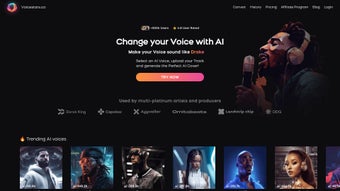
Voicestars is an innovative web‑based AI music generator that lets creators transform any YouTube link into a fully‑produced cover song sung by the virtual voices of world‑famous artists. By simply pasting a YouTube URL, selecting a desired AI voice—such as AI Drake, AI Kanye West, or AI Michael Jackson—and hitting “Generate,” the platform crafts a high‑quality vocal track that matches the original melody while delivering the unmistakable timbre of the chosen celebrity. Premium voices, including AI Harry Styles and AI Olivia Rodrigo, are available for purchase, expanding the creative palette for producers, musicians, and content creators alike.
The service also offers a commercial‑license option, allowing users to publish AI‑generated covers on major streaming platforms without legal concerns. An affiliate program rewards members who refer new users, making Voicestars not only a creative tool but also a potential revenue source. Security‑focused architecture ensures that user data and uploaded files remain private and encrypted throughout the process. Whether you’re a bedroom producer looking for fresh vocal ideas or a marketer needing a quick, royalty‑free track, Voicestars combines ease of use, powerful AI, and a growing library of trending voices into a single, secure platform.
Features, Installation & Compatibility
Key Features
- AI‑Generated Covers from YouTube URLs – Turn any public YouTube video into a custom vocal track in seconds.
- Extensive Voice Library – Free voices (AI Drake, AI Kanye, AI Michael Jackson) plus premium voices (AI Harry Styles, AI Olivia Rodrigo, etc.).
- Commercial License – Optional licensing that grants rights to publish covers on Spotify, Apple Music, and other streaming services.
- Affiliate Program – Earn commissions by promoting Voicestars to fellow creators.
- Secure Cloud Processing – All audio files are encrypted during upload, processing, and storage.
- Multi‑Track Editing – Adjust pitch, tempo, and vocal effects directly in the web editor before final export.
- High‑Resolution Export – Download covers in WAV or MP3 at up to 48 kHz/24‑bit quality.
Step‑by‑Step Installation & Usage Guide
Voicestars is a fully browser‑based application, so there is no traditional software installation required. Follow these simple steps to start creating AI covers:
- Create an Account: Visit voicestars.com and sign up using an email address or social login. A verification email confirms your account and unlocks the free voice library.
- Choose a Voice: After logging in, navigate to the “Voice Marketplace.” Free voices appear with a “Select” button, while premium voices display a price tag. Purchase premium voices via Stripe or PayPal; the transaction is added instantly to your account.
- Paste a YouTube Link: Copy the URL of any public YouTube video containing the instrumental or vocal you wish to cover. Paste it into the “Source URL” field. Voicestars automatically extracts the audio, removes the original vocals (if present), and prepares a clean backing track.
- Generate the Cover: Click “Generate.” The AI engine analyses the melody, tempo, and key, then synthesizes a new vocal line using the selected AI voice. This process typically completes within 30‑90 seconds, depending on track length.
- Fine‑Tune (Optional): Use the built‑in editor to adjust pitch, add reverb, or change the vocal timbre. You can also swap verses, modify lyrics, or layer multiple AI voices for harmonies.
- Export & Publish: Choose your export format (WAV or MP3) and download the file. If you have purchased a commercial license, you’ll receive a downloadable license certificate that can be attached to your streaming uploads.
Compatibility
- Windows 10/11 – Works in Chrome, Edge, or Firefox.
- macOS Monterey and later – Fully compatible with Safari, Chrome, and Firefox.
- Linux (Ubuntu, Fedora, etc.) – Browser‑based access ensures full functionality.
- Mobile – Optimized for iOS (Safari, Chrome) and Android (Chrome) browsers, though advanced editing features are best experienced on desktop.
Because Voicestars runs entirely in the cloud, the only requirement is a modern, up‑to‑date web browser with JavaScript enabled. No additional plugins or heavyweight installations are needed, making it ideal for on‑the‑go creators who switch between devices.
Frequently Asked Questions
Can I use Voicestars to create covers for commercial release?
Yes. By purchasing the optional commercial license, you obtain the rights to publish AI‑generated covers on streaming platforms such as Spotify, Apple Music, and YouTube. The license includes a royalty‑free clause for the specific track you generate, allowing you to monetize the release without additional fees.
What file formats does Voicestars support for download?
Voicestars offers lossless WAV (48 kHz/24‑bit) and high‑quality MP3 (320 kbps) exports. Both formats are ready for professional mixing or immediate upload to streaming services.
Is my uploaded YouTube content stored permanently?
Uploaded audio is processed in a secure, encrypted environment and automatically deleted from Voicestars’ servers 48 hours after the cover is generated, unless you choose to save the project in your personal library for later editing.
Do I need any technical knowledge to create a cover?
No. Voicestars is designed for both beginners and seasoned producers. The step‑by‑step wizard walks you through URL input, voice selection, and optional fine‑tuning, requiring only a basic understanding of music tempo and key.
How does the affiliate program work?
After registering for the affiliate dashboard, you receive a unique referral link. Every time a new user signs up and purchases a premium voice or commercial license through your link, you earn a 15 % commission on the transaction. Payments are issued monthly via PayPal.
Conclusion & Call to Action
Pros & Cons
- Pros:
- Instant AI‑generated covers from any YouTube link.
- Extensive free voice library plus premium celebrity voices.
- Commercial licensing available for streaming distribution.
- Secure cloud processing with automatic data deletion.
- Affiliate program adds a monetization layer for promoters.
- Browser‑based – no heavy software installations required.
- Cons:
- Premium voices require additional purchase, which may be pricey for hobbyists.
- High‑quality output depends on the quality of the source YouTube audio.
- Advanced mixing tools are limited compared to full‑DAW software.
- Commercial license is optional, so users must remember to purchase it for monetization.
Overall, Voicestars stands out as a fast, secure, and creatively empowering tool for anyone looking to add AI‑driven vocals to their music projects. Its blend of free and premium voices, straightforward workflow, and optional commercial licensing make it suitable for both casual creators and professional producers.
Ready to experiment with AI‑generated covers? Click the button below to create a free account, explore the voice library, and start turning YouTube tracks into personalized hits. Don’t forget to check out the premium voice bundles and commercial license if you plan to release your covers on streaming platforms.



.png)



